


Music Player - MP3 & Playlists
4.479.00 Reviews
App Specs
- Version
- 1.0.50
- Updated On
- License
- Free
- Downloads
- 5,000,000+
- Developer
- EAGLE APPS
- Categories
- Music & Audio
- Platform
- Android
Screenshots
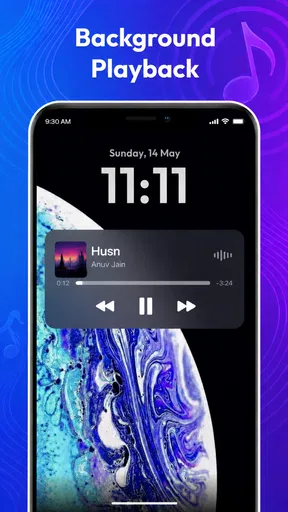
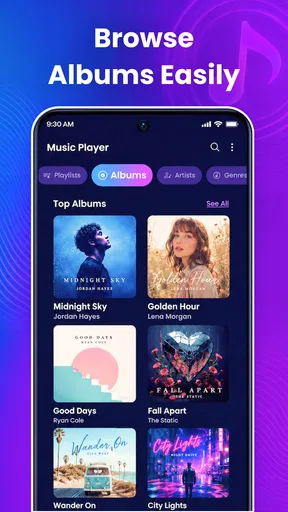
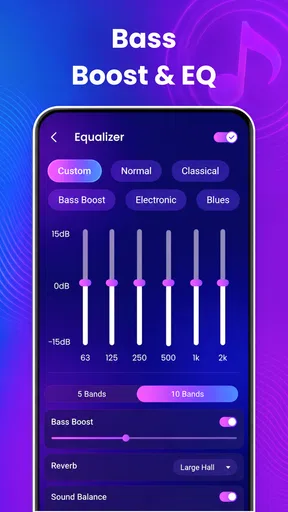
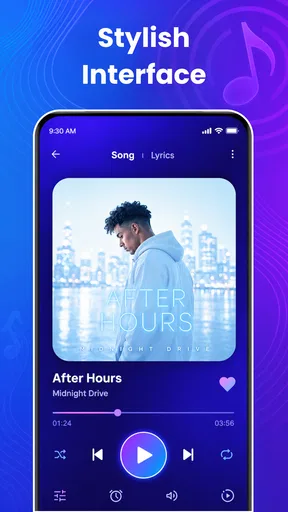
 Analysis by AppCompare
I like Play Song Offline Music Player best when I think of it as a straightforward home for music files already on my phone, rather than a replacement for a streaming service. That distinction matters: its appeal is having a personal collection ready without a connection, with playback tools such as an equalizer and lyrics. If that matches how you listen, it is worth a look; if you expect a huge online catalog or a service that finds and downloads music for you, you may be happier elsewhere.
Where an offline player earns its place
A local music player solves a different problem from a streaming app. It is useful when you already have audio files you are entitled to play and want a familiar collection available on a commute, during a workout, or somewhere reception is unreliable. With a streaming service, offline listening commonly depends on its own catalog, account, and download rules. A player centered on files is a better fit when you want to manage your own tracks and avoid relying on a live connection during playback.
That difference is also a trade-off. The app cannot make a missing song appear in your library just because you want to hear it. You need to have music files ready to use, and you need to keep track of where those files live on your device. For someone with a carefully maintained collection, this can feel pleasantly direct. For someone who has moved entirely to streaming and has no local files, the first step may be more effort than the eventual listening benefit is worth.
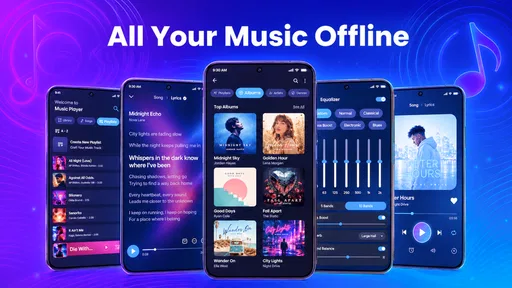
I would treat the equalizer as a personal adjustment tool, not a promise that every track will sound better. A small change can make a collection more comfortable through headphones or a speaker, but heavy adjustments can muddy a recording or make different albums sound uneven. My practical approach would be to start with a restrained setting, listen to a familiar song, and change only what seems missing. That keeps the adjustment useful rather than turning every listening session into a sound-tuning project.
A more practical way to build a library
If you are preparing music for a trip, I would organize it before leaving rather than wait until you are packing. Import the files you actually plan to hear, then make a short playlist for the journey and another for the moments when you want a different mood. That simple split is more helpful than copying every track without a plan: it makes the library easier to browse and reduces the chance that you spend your first few minutes offline searching through a large collection.
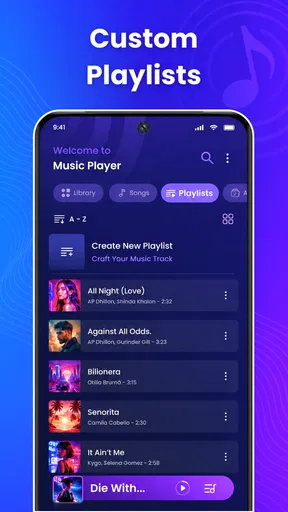
Playlists can also serve as a lightweight way to separate contexts. A workout list does not need to contain the same tracks as a quiet evening list, and a travel playlist can mix familiar favorites without requiring you to change the whole library. The useful detail is not just that playlists can be made, but that a little planning makes offline playback feel dependable. I would check that the tracks I expect to use appear in the library before relying on them away from home.
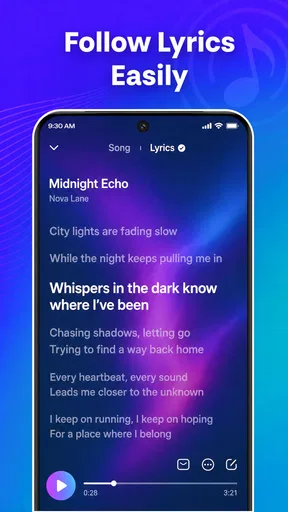
Lyrics are another reason the app may appeal to people who like to follow a song rather than leave it playing in the background. They can make a familiar track more engaging, or help when you are trying to catch a line you have never quite understood. I would not choose a player on lyrics alone, though: the main question is still whether your own music is available and easy to navigate. Think of lyrics as a welcome part of the listening experience, not a substitute for a dedicated lyric search service.
Worth Reading Before You Choose

Flipboard Shows What News Apps Must Do Beyond the Feed

Switching to Android Auto Means Rethinking Your Driving Routine

Google Calendar Makes a Crowded Week Easier to Manage

Ludo King Makes the Most of the Minutes Between Plans

Baby Panda World Brings Quick Play to Modern Phones, but Its Game Library Feels Busy

ESPN’s Live Game View Makes Following Close Games Easier
Who should choose it—and who should pass
I can see this working well for listeners who keep music files on their phone, prefer a direct library over recommendations, and want to listen where mobile data is inconvenient. It also makes sense for someone who values having playback controls and sound adjustments together without needing to open a broader media platform. If that describes you, a focused player may feel less distracting than an app built around discovering new releases, social features, and a constantly changing catalog.
On the other hand, I would steer a streaming-first listener toward a service whose catalog and offline downloads match their habits. I would also suggest a more specialized audio library tool to anyone who needs detailed collection management, extensive format controls, or a particular workflow for handling a large archive. Those are different needs from simply playing personal tracks. The right choice depends less on which app has the longest feature list and more on whether you want to manage files or access a service’s catalog.
For a realistic everyday example, imagine putting together a playlist at home before a train ride through areas with patchy reception. With your tracks already in the library, you can start playback without needing to search online mid-journey. A playlist made in advance keeps the session simple; an equalizer adjustment can be saved for the headphones you are using, if the available controls suit your preference. The limitation is equally clear: any track you forgot to bring into the library will not be rescued by the offline focus.
There are a few sensible questions to ask before committing. Does it work with your music? The app is intended for playing music files, so I would first confirm that the tracks you plan to use are available on your device and appear in its library. Can you use it without internet? Offline playback is the point once songs are loaded, making it a practical choice for places with no connection. Is it a music service with a catalog to browse? I would not approach it as a substitute for a streaming subscription; its strength is playing music you already have.
It is also worth thinking about the cost before assuming every feature is free. The app is free to install, while in-app purchases are offered at prices ranging from $13.99 to $49.99 per item. I would check what an offered purchase unlocks and whether I actually need it before spending. That is especially relevant if your only goal is basic offline playback: make sure the free experience suits your routine first rather than paying simply because an optional purchase is visible.
Play Song is developed by EAGLE APPS and sits in the music and audio category. It has a 4.2 average from around 4.7 thousand ratings, and it has passed 5 million installs. Those figures suggest it has found an audience, but they do not tell me whether it will suit a particular music library. The more useful test is whether its approach fits how you keep and play your tracks.
The app is rated for Everyone and is free to download. It was released on May 21, 2025, and version 1.0.45 is the current version. Android users need version 7.0 or later. If you are choosing a player for a family device or an older phone, those basics help you decide whether it is appropriate and compatible before setting up a library.
One practical trade-off with any file-based player is that your organization depends partly on the files you bring into it. If names or folders are inconsistent, browsing a collection may be less pleasant than using a service that presents a polished catalog with artwork and searchable metadata. I would spend a few minutes tidying the collection before importing it, especially if I expect to use playlists regularly. A little preparation can matter more than repeated adjustments later.
Battery and storage are also worth considering in a broader sense, even without assuming a particular app-specific impact. Offline files take space on the device, so a listener with limited storage may want to import only the albums and playlists they use most. That selective approach keeps a travel or exercise library manageable and avoids treating a phone as an unlimited archive. If your entire collection is large, keeping a separate backup and choosing a smaller on-device selection is a more practical routine.
For someone who listens while moving between tasks, the best workflow is usually to decide on the next listening session in advance. A short playlist for a run or a longer one for a journey saves browsing time, while a familiar track gives you a quick way to judge whether an equalizer change helps. These habits make the app more useful without requiring complicated setup. They also make its limits easier to spot early, before you depend on it for a trip or a long day away from a connection.
Getting Started with Your Offline Playlist
First things first, downloading the Play Song Offline Music Player was a breeze. Available on both Android and iOS, it’s a quick download and doesn’t hog too much space on your device. As someone who’s always juggling storage, that’s a big win.
Once you open the app, you’re greeted with a clean, user-friendly interface. It’s straightforward, which I appreciate because I’m not a fan of overly complicated apps. You can easily navigate through your library, playlists, and settings without getting lost in a sea of options.
Loading Up Your Library
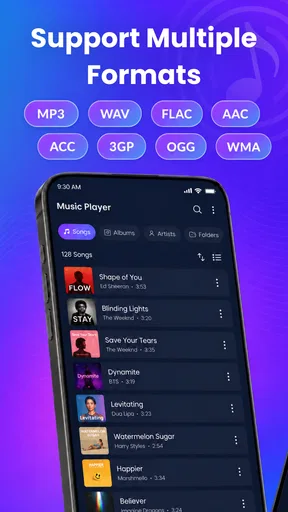
Adding songs to your library is super simple. You have the option to import your existing music files directly into the app. This means all your favorite tracks are ready to play, even when you’re offline. The app supports a variety of file formats, so you won’t have to worry about compatibility issues. I was able to load up my entire collection without a hitch.
One of the features I found particularly handy is the ability to create and customize playlists. Whether you’re curating a workout mix or a chill-out session, organizing your tunes is incredibly intuitive. Just drag and drop your songs into a new playlist, and you’re good to go.
Tuning into the Experience
Now, let’s talk about the actual listening experience. The audio quality is top-notch, which is crucial for any music app worth its salt. I tested it with a range of genres, from bass-heavy tracks to acoustic gems, and everything sounded crisp and clear.
The app also includes an equalizer, allowing you to tweak the sound to your liking. This is perfect for audiophiles who love to fine-tune their music. I played around with the settings, and it definitely enhanced my listening experience.
Offline Features that Shine
As the name suggests, the standout feature of this app is its offline capability. Once your songs are loaded, you can listen to them anytime, anywhere. This is perfect for those long flights or road trips where internet access is spotty at best.
Another cool feature is the sleep timer. If you’re like me and love falling asleep to music, you’ll appreciate this. Set the timer, and the app will automatically stop playing after the designated time. It’s a small feature, but it’s those little things that make a big difference.
Overall Thoughts
After spending some quality time with the Play Song Offline Music Player, I can say it’s a solid choice for anyone looking to enjoy their music without the constant need for internet connectivity. It’s straightforward, effective, and offers a high-quality audio experience.
Whether you’re an audiophile or just someone who likes to have their favorite tracks at their fingertips, this app covers all the bases. Give it a shot, and you might find it becomes your go-to music player.
So, if you’re ready to take your music offline and enjoy a seamless listening experience, you can find the download links right here on our site. Happy listening!
Pros
- User-friendly interface for easy navigation.
- Supports a wide range of audio formats.
- No internet required for playback.
- Customizable equalizer settings.
- Lightweight
- doesn’t drain battery.
Cons
- Limited advanced features for audiophiles.
- Contains some in-app advertisements.
- Customization options are basic.
- No cloud sync for playlists.
- Lacks integration with streaming services.
FAQs for Music Player - MP3 & Playlists
Does Play Song Offline Music Player require an internet connection?
No, Play Song Offline Music Player does not require an internet connection to play music. It is designed specifically for offline use, allowing you to enjoy your favorite tracks anywhere. However, you'll need to download songs onto your device beforehand, as the app does not support streaming.
What audio formats are supported by Play Song Offline Music Player?
Play Song Offline Music Player supports a wide range of audio formats including MP3, WAV, AAC, and FLAC. This ensures compatibility with most music files you might already have. If you encounter a rare format that isn't supported, consider using a file converter before adding it to the app.
Can I create and manage playlists in Play Song Offline Music Player?
Yes, you can easily create and manage playlists within Play Song Offline Music Player. The app provides intuitive tools to organize your music collection, allowing you to tailor playlists for different moods or occasions. You can also edit existing playlists, rearranging songs as needed.
Is Play Song Offline Music Player free to use?
Play Song Offline Music Player offers a free version with basic features. However, there may be optional in-app purchases or a premium version available that unlocks additional features, removes ads, or enhances functionality. Be sure to check the app’s description for detailed pricing information.
How does Play Song Offline Music Player manage music library updates?
The app automatically scans your device for new music files and updates its library accordingly. You can also manually refresh the library through the app’s settings if needed. This ensures that any new tracks you add to your device are quickly available for playback.


